Online appointment booking
Online appointment booking and payment system for growing clinics & private practices
Patients book and pay themselves from a link, a QR code or inside WhatsApp. Reminders go out on WhatsApp, happy patients get a Google review follow-up, and an AI agent answers FAQs, handles bookings and smartly escalates complex queries to your team — all in one calendar, so nobody double-books.
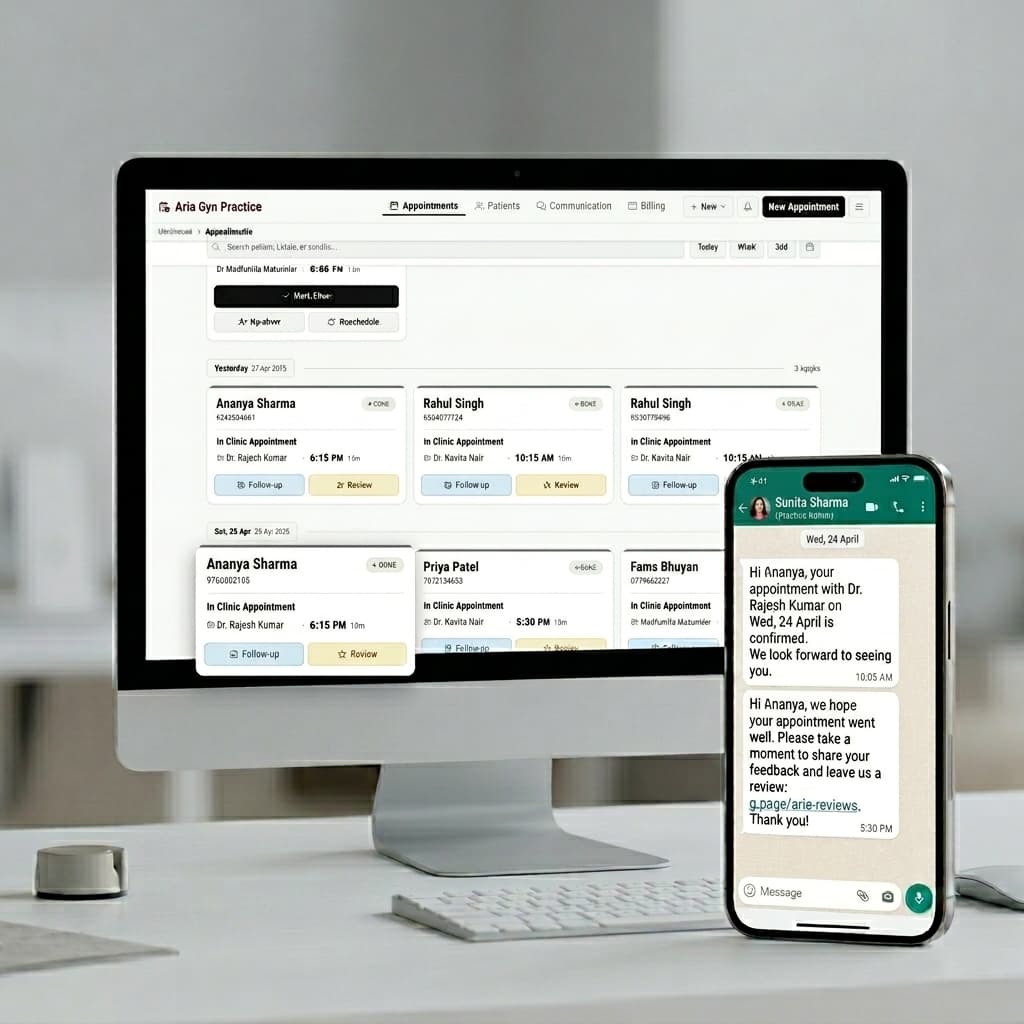
One schedule
One list, four ways in
Online, WhatsApp, phone, walk-in. Phone and walk-in appointments you add yourself in two taps. Everything sits in one schedule, so nobody double-books the 6pm slot.
Online
The link on your Google profile, your Instagram bio, or the QR code at reception. The patient picks from the slots you actually have free.
WhatsApp
A form opens inside the chat — doctor, service, date, time, done. No app, no login, no link out to a browser. They can cancel or ask to move it the same way.
Phone
Your staff takes the call and types it in — name, number, slot. The patient still gets the same WhatsApp confirmation.
Walk-in
Two taps at the front desk and they are in the queue, in the order they will actually be seen.
How it works
Set it up in three steps
Setup is your working days, your slot length and the services you offer. About twenty minutes, once.
Set your hours and services
Pick your working days. Pick how long a visit takes. List what you offer. Block lunch, surgery days and leave, and those slots never show.
Put the link everywhere patients look
Your Google page, your Instagram, your website, and a QR code on the front desk. Most bookings come from the Google page, because that is where people look for a doctor first.
Accept, and the rest happens
The request reaches you on WhatsApp. Accept it and the patient gets the confirmation. Or turn on auto-confirm and skip this step.
What the patient sees
An automatic confirmation, the moment you confirm
A patient who books and hears nothing back thinks it did not work. Then they ring you to check. This message stops that call.
📅 Tue, 12 Aug · 6:30 PM
🎟️ Token 14
Reply here if you need to change it.
Scheduling software
Appointment scheduling built around the walk-ins
Most scheduling tools assume the patient books themselves. In an Indian clinic, most of them turn up — on the phone, or at the desk. Online bookings, phone calls, WhatsApp and walk-ins all land in the same queue, in the order patients will actually be seen, not just on a calendar that only knows about the ones who booked online.
A calendar isn't a queue
Slot-based tools show times. A clinic runs an order — who's next — and it changes all morning as walk-ins arrive and consultations run long.
Email reminders don't get read
WhatsApp does. The reminder that arrives where the patient already is, is the one that works.
Two lists means double bookings
When the walk-ins live in a register and the online bookings live in software, the slot gets sold twice by eleven o'clock.
Comparing whole systems rather than a calendar? Start with clinic management software →
Google Calendar sync
It knows when you're busy
Connect Google Calendar and FormAlert blocks the times you're already booked. Google Calendar appointment booking that reads your real week: your surgery list, your kid's function, your Thursday off — patients never see those slots. Confirmed appointments go the other way, onto your calendar, the moment they're booked.
Connect the calendar you actually use
One click at setup. Pick the calendar that already holds your surgeries, rounds and travel — the one with the clashes in it.
Anything on it blocks the slot
You don't enter things twice, and a patient can't take a slot you already gave away.
Bookings come back the other way
Every confirmed appointment — online, walk-in, phone or WhatsApp — shows on your Google Calendar too.
Your calendar, reachable from WhatsApp
“WhatsApp calendar” is what doctors type when they mean the thing FormAlert actually does: one calendar, booked into from the app their patients already have open. On the Business plan a patient messages your clinic number and a booking form opens inside the chat — she picks a service and a slot, and it lands in the same queue as every online, walk-in and phone booking, against the same Google Calendar that already knows you are in surgery on Thursday.
There is no separate WhatsApp calendar to keep in step with your real one, which is the trap in most of what gets sold under that name. There is one calendar, and WhatsApp is a door into it.
On your own website
Put the calendar on your website
Embed the booking calendar on your website with one line of code, or use the WordPress appointment booking system embed. No plugin to buy. FormAlert hosts the calendar and your site displays it, the way a YouTube video or a Google Map embed works — so there's nothing to install, no version conflicts with your theme, and nothing that breaks on the next WordPress core update.
Copy your embed code from the Share tab
Your booking link is already filled in — one snippet, ready to paste.
Paste it into any page, post, or widget
A Custom HTML block in the WordPress editor, or an HTML/embed widget in Elementor, Divi, Wix or Squarespace — any of them accept the same snippet.
Your live calendar appears on the page
Patients pick a service and a slot right there. The booking lands on your dashboard and your synced Google Calendar, same as a booking from anywhere else.
Plugins like Booknetic and Bookly are capable tools, but they run inside WordPress and share its database, PHP and theme CSS with every other plugin — that's where conflicts and slowdowns come from. An iframe embed can't collide with any of that, and Razorpay payment collection and WhatsApp reminders come built in rather than needing a separate paid add-on.
<iframe
  src="https://www.formalert.in/book/your-clinic"
  width="100%"
  height="720px"
  frameborder="0"
  style="border:none;border-radius:12px;">
</iframe>
Your real snippet, with your own booking address, is in the Embed tab of your dashboard.
WordPress
Block editor, Elementor, Divi or the classic editor — all of them accept the same snippet. No plugin.
Wix
Add an HTML iframe element from the element panel and paste the code in.
Squarespace
Drop a Code Block onto any page and paste the same snippet.
Plain HTML
Paste the tag directly into your page. No framework, no build step, nothing to install.
Payment at booking
Take payment at booking
Collect the fee or a deposit by UPI, card or netbanking when the slot is booked, through your own Razorpay account. The booking confirms itself when the payment clears, and online consultations get a Google Meet link on WhatsApp.
The honest bit
What this doesn't do
What this doesn't do
This will not stop your phone ringing. More people will find you, so some will call. What it stops is the call that was only there to book a slot. It also only covers patients who come through the link. The ones who ring or walk in are typed in by your staff, into the same queue. And if you embed it on your website: the calendar doesn't inherit your site's fonts and colours — it's a booking page in a frame, not a themed widget, and on a heavily designed site it reads as a distinct panel. It also only captures patients already on your site — most clinics get more bookings from their Google Business Profile link than their own website, so treat the embed as one channel, not the whole plan.
Price
One plan, everything on it
Business
₹1,999/month, or ₹17,999/year — the booking page, the QR code, booking inside a WhatsApp chat, 24-hour and 2-hour reminders and the review request, all from your clinic's own WhatsApp number, with Meta billing you for messages directly.
Your 14-day trial runs the same booking page and sends from FormAlert's shared WhatsApp number, so nothing waits on Meta before you can see it work.
Nothing is held back and nothing is priced per booking. What subscribing changes is the number on the patient's phone.
One queue for every appointment, however it comes in.
₹1,999/month, or ₹17,999 a year, with every message from your clinic's own WhatsApp number. 14 days free on ours, no card. Or see how it works and follow the whole sequence through first.
14 days free. No card. Cancel any time.
In short
FormAlert is a scheduling system for clinics in India that run on WhatsApp, built for doctors in independent private practice and small clinics. It runs the appointment side of a practice — online, QR code and WhatsApp booking, walk-ins and phone bookings in the same queue, automated WhatsApp reminders and Google review requests — so that patients get booked, reminded and asked for a review without anyone at the clinic typing a message, and the clinic's Google rating reflects the care it gives. FormAlert is an official Meta Tech Provider, which is what lets it create a WhatsApp Business API account in the clinic's own name rather than renting the clinic space on somebody else's. Patients book from a web page, by scanning a QR code at the clinic, or by messaging the clinic on WhatsApp, and the booking form can carry whatever questions the practice wants to ask, with photos and documents attached. The clinic confirms the appointment and marks the visit complete; FormAlert sends the confirmation, reminds the patient 24 hours and 2 hours before the visit, and asks for a Google review afterwards. Once the clinic's own WhatsApp number is connected, an AI booking assistant, included with the subscription, answers patients at any hour, books from the clinic's real calendar, and hands anything else to the clinic's staff. There is one plan, at ₹1,999/month or ₹17,999/year — the yearly price works out at ₹1,500 a month and saves ₹5,989 — and everything is on it: all of those messages, the clinic's own WhatsApp Business API number and templates, which Meta then bills the clinic for directly with no FormAlert markup, as many doctors as the clinic has with a calendar each, a login each for them and the front desk, a waiting-room queue display, a patient portal, and patients rescheduling or cancelling themselves inside WhatsApp. There is no setup fee, and nothing is priced per doctor, per seat or per booking. The WhatsApp number a clinic sends from changes once: during the 14-day free trial, which takes no card and includes 50 credits, messages go from FormAlert's shared WhatsApp number at ₹1 a message against that allowance, and the clinic can connect its own number, during the trial or after subscribing, through Meta's Embedded Signup inside FormAlert — a clinic already using the WhatsApp Business app can link the number it already runs, bringing its chats across — after which every message carries the clinic's own name. Meta verifies the business behind that number; a clinic whose Meta business is already verified connects the same day, and one that is not registered yet uses a free MSME Udyam certificate, issued from Aadhaar and PAN and usually the same day at udyamregistration.gov.in, or a GST certificate if it has one. FormAlert files that verification and the message templates with Meta on the clinic's behalf. Because that WhatsApp account is created inside the clinic's own Meta business portfolio, a clinic that stops paying FormAlert keeps the number and the account and can use them with any other software.