WhatsApp messages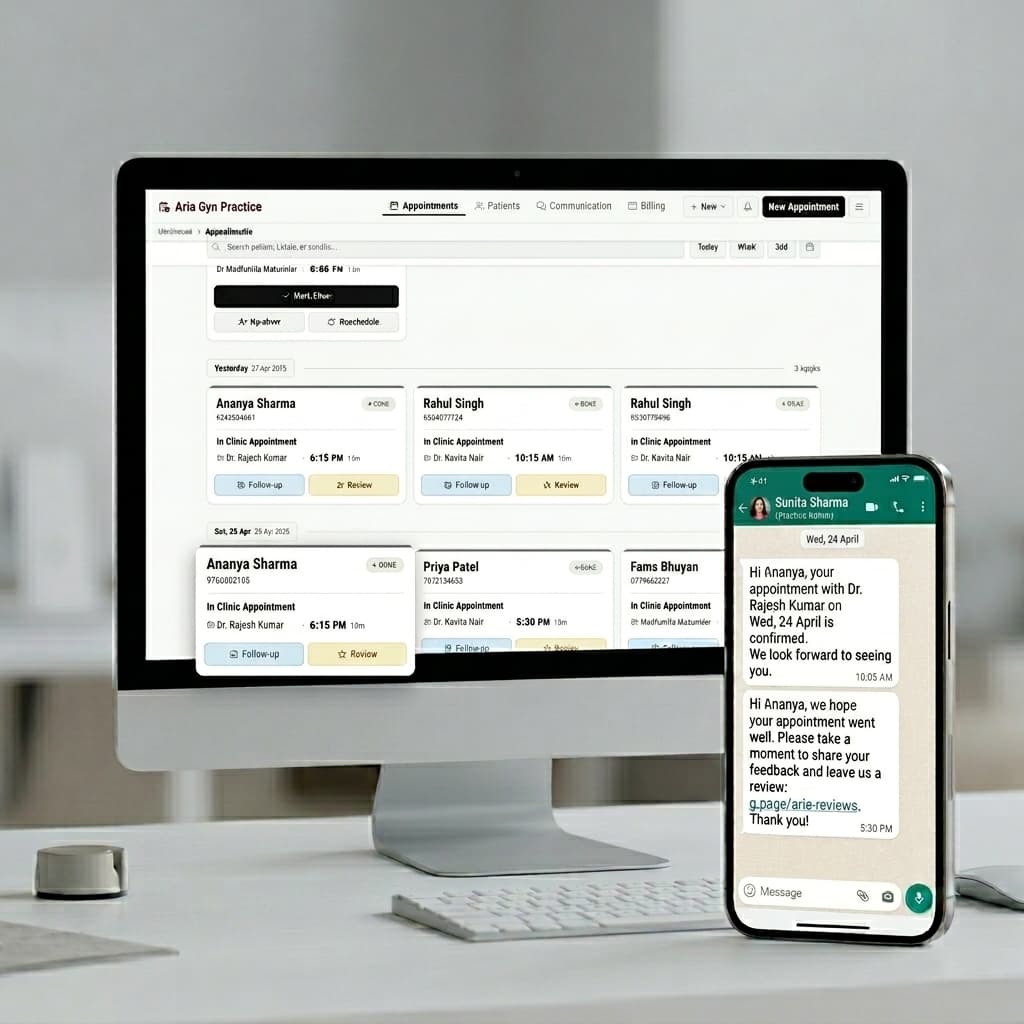
WhatsApp automation for clinics
For clinics and small practices — not a personal reminder appPatients get confirmed, get reminded and get asked for a review — all in the chat they already have open — and after hours an AI assistant answers them and books the slot. Nobody on your staff types any of it. How booking inside WhatsApp works →
₹1,999 a month, or ₹17,999 a year. Your 14 free days send from our WhatsApp number, so you can watch it work without registering anything with Meta. Subscribe and we set up a WhatsApp number in your clinic's name — or link the WhatsApp Business app number you already use — with your own message wording, and Meta bills you for messages directly at its own rate. After that patients see you, not us.
Part of FormAlert's full booking-to-review flow — see how it all connects →
Why this channel
Why WhatsApp and not email or SMS
Your patients read WhatsApp. They don't read clinic emails, and SMS lands in the promotions bin next to the loan offers. This isn't a preference, it's where the messages actually get seen.
Each message triggers off a different moment in the appointment's lifecycle — nothing is sent manually, and nothing depends on staff remembering.
1
Booking confirmation — the instant it's confirmed
Online, walk-in, or phone booking, the patient gets a WhatsApp message with date, time, and provider as soon as the appointment is confirmed. Every plan.
How confirmation messages work →2
Reminders — 24 hours and 2 hours before
Two automatic reminders close the gap between confirming and forgetting — the second one catches the patients who'd otherwise simply not show up.
Business planSee how reminders work →3
Review request — the moment the visit is marked complete
Staff marks the appointment complete, and a WhatsApp message with a direct link to your Google review page goes out immediately. Every plan.
See how review automation works →What this doesn't do
It does not stop your phone ringing. A booking link on your Google page means more people find you, so some will call. It does not type in the phone and walk-in bookings either. Your staff does that. What it fixes is the message nobody sent. The confirmation. The reminder. The review request. Those go out whether anyone remembers or not.
Stop sending any of this by hand.
14-day free trial, no credit card needed. Live in 20 minutes.
Start your free trialWhy confirmation matters
Automatic booking confirmations, sent the moment you confirm
A patient who books doesn't fully believe it's real until something comes back confirming it. Without that, they're one distraction away from forgetting the whole thing happened.
Proof the booking went through
No more "did that actually work?" — the patient sees confirmation in their WhatsApp within seconds of your approval.
No manual texting for staff
Your front desk doesn't have to remember to message every patient — it goes out automatically the moment the appointment is approved.
An early anchor before the reminders
Confirmation plants the appointment in the patient's mind well before the 24-hour and 2-hour reminders reinforce it later.
Everything the patient needs, nothing they have to ask for
One message answers the questions a patient would otherwise call to ask.
StatusConfirmed
DetailsToken / visit type
Date / time4:30 PM, 22 Jul
LocationClinic address / Meet link
ContactClinic phone number
For online consultations, the location field carries the Google Meet link instead of an address. A patient who needs a different time can simply reply — your staff sees it in the dashboard and can offer another slot.
Where confirmation sits in the full flow
Confirmation is one link in a longer automated sequence — booking, alert, confirmation, two reminders, the visit, and the review request.
1. Book→2. Alert→3–4. Confirm→5–6. Remind→7. Visit→8. Review
Free templates
Every message your clinic sends
Booking confirmation, the two reminders, reschedules and cancellations, the no-show rebooking message, the follow-up and the review request. All written and approved already — you can edit the wording, but you don't have to write any of it.
How reminders work
Automatic appointment reminders, 24 hours and 2 hours before
Set it up once and every confirmed appointment gets covered — no manual sending, no spreadsheet of who to remind. This is the channel reminders run on; for the full rundown of the reminders job itself — timing, plans, and what happens if a patient doesn't reply — see the dedicated reminders page →
1
Patient books an appointment
Online through your booking link, or added by your staff for a walk-in or phone booking — either way, it lands on the same calendar.
2
A WhatsApp reminder goes out 24 hours before
Sent the evening before, with the date, time, and provider — giving the patient time to reschedule if something's come up.
Business plan3
A second reminder goes out 2 hours before
The final nudge — catches the patients who genuinely just forgot and would otherwise miss the slot.
Business plan4
Patients can reply to reschedule
A patient who can't make it replies to the reminder — your dashboard shows the conversation so your staff can offer another slot instead of losing it to a no-show.
Reminders follow the calendar you already use
Connect Google Calendar once and it's two-way — appointments booked through FormAlert appear on your calendar, and your existing calendar events block those slots from being booked online. Reminders trigger off the same confirmed appointment either way.
WhatsApp vs. SMS vs. reminder calls
FormAlert sends reminders over WhatsApp — here's why that beats the alternatives for reaching patients in India.
| Channel | Why it falls short |
|---|---|
| Checked multiple times a day, doesn't interrupt like a call — this is what FormAlert uses. | |
| SMS | Gets delivered, but rarely read carefully — easy to glance past and forget. |
| Reminder calls | Costs staff time to dial and wait for pickup — doesn't scale past a handful of patients a day, and many don't answer unknown numbers. |
Every confirmed appointment gets a reminder — automatically.
14-day free trial, no credit card needed.
Set up automated reminders →What to look for
Not all appointment reminder software is built the same way
"Appointment reminder software" ranges from a basic SMS blast tool to a full reminder system tied to your booking calendar. For a clinic, a few things matter more than a long feature list.
WhatsApp delivery, not just SMS
SMS gets filtered as spam more often than not. A reminder on WhatsApp gets seen.
Fully automatic scheduling
The reminder should fire on its own once a booking is confirmed — not depend on a staff member remembering.
Two reminders, timed right
One reminder a day out (time to reschedule) and one a couple of hours out (the final nudge) catches more no-shows than a single reminder.
Tied to your actual calendar
Reminders should come from the same system where the booking lives, so a reschedule or cancellation updates the reminder automatically.
Your own sender number
Messages from a number patients recognize as your clinic build more trust than an anonymous shortcode.
FormAlert vs. typical SMS/email reminder tools
Generic reminder software is usually built for a global, email-first market. Here's where that shows up for a clinic in India.
| Criteria | FormAlert | Typical SMS/email reminder tool |
|---|---|---|
| Primary channel | SMS or email | |
| Reminder timing | 24h and 2h before, automatic | Usually one fixed reminder, manually configured |
| Tied to booking calendar | Yes — same system as your appointments | Often a separate tool bolted onto your calendar |
| Sender identity | Your clinic's own WhatsApp number (Business plan) | Shared shortcode or generic sender ID |
| Pricing | ₹1,999/month flat, in INR | Often USD, per-message SMS credits add up |
Built for clinics specifically
This isn't a general-purpose reminder tool retrofitted for healthcare — it's built around how a small private practice actually runs, from a solo doctor's single calendar to a multi-practitioner clinic with a front desk.
Follow-up reminders
Automatic follow-ups and next-appointment reminders
You tell a patient to "come back in two weeks" and move on to the next consultation. No one writes it down. No one calls them in two weeks. The patient forgets, or assumes it wasn't important — and books with someone else next time they need care.
"Come back in two weeks" gets lost
Verbal instructions at the end of a visit rarely turn into an actual booking once the patient walks out.
Recall calls take staff time
Calling every patient back to remind them of a follow-up isn't realistic once your patient list grows past a handful of names.
A one-time patient is a lost patient
Every skipped follow-up is a patient who might never come back — and never becomes a repeat visit or a referral.
Schedule once. FormAlert reminds automatically.
Follow-ups are set up from any completed appointment — no separate system, no spreadsheet of patients to call back.
1
Open the completed appointment and click "Schedule Follow-up"
From the patient's visit — in Appointments or on their patient profile — pick a date. Available slots for that provider load automatically.
2
Add a note for yourself
e.g. "review blood test results" or "check healing progress" — so the reason for the visit isn't lost between now and then.
3
It's confirmed on the spot — and no message goes out
You booked it with the patient in front of you, so a WhatsApp repeating what the doctor just told them would only be noise. The reminders are what they actually need.
4
Reminders go out on their own — 24 hours and 2 hours before
The same reminder system that protects every appointment on FormAlert covers the follow-up too. Nothing else to set up.
Business planRepeat patients are the cheapest patients you'll ever get
Getting a new patient through the door costs time, marketing, and reputation you've had to build up. A patient who's already sat across from you needs none of that — they just need a reason to come back that doesn't fall through the cracks.
1 click
To schedule a follow-up from a completed visit — no separate booking flow.
2
Automatic WhatsApp reminders per follow-up — 24 hours and 2 hours before.
0
Recall calls your staff has to make. FormAlert handles the reminding.
Every follow-up is a chance to keep a patient. Don't let it slip.
Set it up once per visit — FormAlert does the reminding, every time.
Doing it yourself
What a WhatsApp booking flow takes to build from scratch
To let patients book over WhatsApp, you need four things. A WhatsApp Business number. Your own WhatsApp Business API, which Meta lets any business register. Message wording approved by Meta. And a calendar behind it all that knows your free slots and sends each message at the right time — that last one is what no amount of Meta paperwork gives you.
None of these steps are hard on their own. The work is in setting all of them up correctly and keeping them running — templates that get rejected, a calendar that falls out of sync, or a reminder that doesn't fire on time all break the flow for a real patient.
1
Get a WhatsApp Business number
Pick a number your clinic will use for booking messages. A brand new number must not be registered on WhatsApp at all. A number already running the WhatsApp Business app can be linked as it is, through Meta's Coexistence signup, keeping its chat history.
2
Apply for WhatsApp Business API access
The regular WhatsApp Business app can't send automatic messages. For that, you need the WhatsApp Business API, which means registering your business with Meta and going through a verification step.
3
Connect it to a platform that can drive it
Meta lets any business register its own verified WhatsApp Business API — you do not need anyone's permission, and the number stays in your clinic's name. What Meta does not give you is software to drive it. Most platforms that fill that gap resell you Meta's messages with their margin on top; a few, FormAlert included, charge one flat fee and leave Meta to bill you directly.
4
Get your message templates approved
Every automatic message — a booking confirmation, a reminder, a review request — has to be submitted as a template and approved by Meta before it can be sent. This can take anywhere from a few hours to a few days.
5
Connect it to a calendar and booking logic
The WhatsApp number on its own doesn't know your schedule. You need a system behind it that checks availability, avoids double-booking, and knows when to trigger each message.
6
Set up the reminder timing
Decide when reminders go out — most clinics see the best results with one the evening before and one a couple of hours before the appointment — and build the logic to send them automatically.
Once it's live, the flow itself is straightforward: a patient messages or books through a link, availability is checked, a confirmation goes out, and reminders fire automatically before the visit. Getting there is the hard part. Doing this yourself takes real setup time — business verification, template approval, and someone to build and maintain the booking logic. Most clinics don't have the time or the technical staff for that.
How FormAlert manages all of this for you
FormAlert is an official Meta Tech Provider, so a clinic never has to work through Meta's verification or template approvals on its own — we do them with you, on a number registered to your clinic. You connect your Google Calendar, set your hours and services, and the booking alerts are already wired up.
During the 14-day free trial, every message — the booking alert to you, the confirmation to the patient, the reminders before the visit and the review request after it — goes out from FormAlert's own registered WhatsApp number. There's nothing for you to register and no templates to submit, so you're live the same day while your own number is being verified.
Booking inside a WhatsApp chat needs a number of your own, which is what subscribing (₹1,999 a month, or ₹17,999 a year) sets up — patients see your name and not ours, and two-way chat means they can reply and your staff can answer from the dashboard. Reminders go out 24 hours and 2 hours before every visit either way; during your trial they leave from our number at ₹1 a message against the credits included.
| What's involved | Doing it yourself | With FormAlert |
|---|---|---|
| Business API registration | Weeks of paperwork and verification | Handled for you, on a call. Nothing waits on it — the trial sends from our number meanwhile. |
| Message templates | Written and submitted for approval yourself | Already built and approved |
| Calendar and booking logic | Built and maintained by a developer | Connect your Google Calendar — done |
| Reminders | You build the timing and triggers | 24h and 2h reminders, on by default (Business) |
Getting the number approved is paperwork — annoying, finite, done once. Keeping the schedule straight, so a WhatsApp booking and a walk-in land in the same list instead of getting sold twice by mid-morning, is the part that actually decides whether any of this works.
Use your own number
We set up a WhatsApp Business API on your own clinic number, so patients see your clinic name in their chat list. Until Meta has verified it, messages go from FormAlert's number. You do not need GST: Meta accepts a free MSME Udyam certificate, made from your Aadhaar and PAN.
How to get the WhatsApp Business API in India, step by step →
On your own number
A shared WhatsApp inbox, from your clinic's own number
All three automations run from your clinic's own registered WhatsApp number, and the conversation goes both ways. During the trial, before Meta has verified your number, they run from FormAlert's shared one instead.
Clinic's own WhatsApp number
Messages come from your registered WhatsApp Business API number, not a shared FormAlert one — patients see your clinic's name.
Two-way patient chat
A patient replying to a reminder to reschedule, or asking a question after a confirmation, lands in your dashboard as a conversation your staff can answer.
Booking inside the chat
Patients pick a doctor, a service and a slot from a form that opens inside WhatsApp, and can cancel outright or ask for a new time you approve in a tap — a form, not a conversation to type through, and no link to tap out to. It is Meta's own appointment flow, published on your number when you connect it.
AI replies after hours
Once your clinic's own WhatsApp number is connected, an AI booking assistant answers patients at any hour, including after the clinic has closed. It tells them which doctors and services you offer, finds a free slot in your real calendar, asks your booking questions and books it, and lets returning patients move or cancel a booking. It replies in the patient's language and follows the notes you give it. Anything else — a medical question, a complaint, a bill — goes to a person on your team, and staff can pause it on any chat. It runs on your own number and comes with the subscription — the free trial does not include it.
Real clinic, real numbers
A private gynaecology clinic runs its whole reminder flow on FormAlert
Automated WhatsApp reminders alongside booking and review requests — all from one system.
42 → 87
Google reviews in 6 months
A solo private practice
Booking, reminders, and reviews running on FormAlert.
See the full booking-to-review flow.
Confirmations, reminders, and review requests are one system underneath — here's how it all connects.
See how it works →WhatsApp appointment booking →Online booking — how patients get into the queue →Appointment message templates →Google review automation →How to reduce no-shows →Scheduling & queue management →Full clinic management system →OPD & walk-in management →Embed booking on your WordPress site →Set up WhatsApp Business API →See pricing →
What to do next
Try it, then decide
Here's exactly what happens if you sign up today.
1
Sign up for the 14-day free trial
No card needed. You're in your dashboard in a couple of minutes.
2
Send review requests with 50 free credits
Add a patient's name and phone number and send — that's the whole flow, one credit per request. No booking setup required to try this part.
3
See if it's worth it
Send a few and watch how many patients actually leave a review. That tells you what to expect before you've paid anything.
4
Subscribe when you're ready
Everything is already running from the first hour — there's nothing you have to set up to start. Separately, we walk you through connecting your own WhatsApp number and get your message templates approved with you.
FAQ
Common questions
How do I get the WhatsApp Business API for my clinic?
Meta lets any business register one — it is not gatekept, and you do not need anyone's permission. You need a phone number that is not already on regular WhatsApp (or an existing WhatsApp Business app number, which can be linked as it is), a Meta business account, and business verification, for which Meta accepts a free MSME/Udyam certificate if your clinic is not GST-registered. Then Meta has to approve each message template before it can be sent. Done alone that is a few days to a few weeks, depending on how complete your documents are. FormAlert is an official Meta Tech Provider and runs the verification and the template submissions for your clinic, which takes two to three days — and the number and the Meta account are registered to you, not to us.
Can I create my own WhatsApp API, or do I have to go through a provider?
You can register your own, and the API belongs to your business either way — worth knowing, because plenty of providers imply otherwise. What Meta gives you is the connection, not the software. Something still has to know your appointment schedule, check whether a slot is free, and decide that this patient gets a reminder at 6pm tomorrow. That is the part a platform does. The question worth asking a provider is not whether they can get you access — it is whether they resell you Meta's messages at a markup, or let Meta bill you directly.
How do I connect a WhatsApp Business account I already use?
Through Meta's Coexistence signup, which links the number you already run the WhatsApp Business app on. You keep the number, your chat history comes across, and your staff carry on replying from the same phone while FormAlert sends the automatic messages alongside them. No patient has to be told a new number. That path sends the same day, because there is no new number for Meta to verify.
Is there one tool that handles WhatsApp booking, reminders, follow-ups and review requests, with a hand-off to a human?
That is what FormAlert is. A patient books from a form inside WhatsApp, from your booking link, or from a QR code at reception; the confirmation goes out when you accept it; reminders go 24 hours and 2 hours before; a Google review request goes after you mark the visit complete; and the next visit is one tap from the completed appointment, reminded the same way. Once your own number is connected, an AI booking assistant answers patients at any hour and books the slot, and anything it cannot answer is handed to a person in your shared inbox. The assistant comes with the subscription, not the free trial.
Can something automatically call patients to confirm appointments?
FormAlert does not make phone calls, and we would rather say so than sell you a robot voice. It sends the confirmation and two reminders on WhatsApp, which in India is read far more reliably than an automated call is answered, and it lets the patient reschedule or cancel from inside the chat — which a call cannot do. If an automated phone call is a hard requirement, FormAlert is not the right fit.
Does FormAlert use AI to answer patients?
Yes, on your own number. Once your clinic's own WhatsApp number is connected, an AI booking assistant answers patients at any hour, including after the clinic has closed. It tells them which doctors and services you offer, finds a free slot in your real calendar, asks your booking questions and books it, and lets returning patients move or cancel a booking. It replies in the patient's language and follows the notes you give it. Anything else — a medical question, a complaint, a bill — goes to a person on your team, and staff can pause it on any chat. It runs on your own number and comes with the subscription — the free trial does not include it.
Can AI handle appointment bookings on WhatsApp after hours?
Yes. The booking assistant answers at any hour, checks your real availability and books the slot through the same calendar your website uses, so it cannot double-book. A patient who wrote at 11pm is booked before the clinic opens.
What happens when a patient asks something the AI can't answer?
The chat is handed to your team. The patient is told someone from the clinic will reply, the conversation waits in your shared WhatsApp inbox with the patient's appointments beside it, and the assistant stays out of that chat while your staff has it. It never gives medical advice.
Can my staff take over a conversation?
Yes, at any point. Replies land in one WhatsApp inbox that your reception, your staff and your manager all see, with that patient's appointments and past visits beside the chat. Anyone can pause the assistant on a chat and answer it themselves. The automatic appointment messages keep going out as normal.
Do you send SMS reminders as well?
No. WhatsApp and email only. In India, SMS gets blocked or ignored too often for us to charge you for it. If you must have SMS, FormAlert is not the right fit.
Is this one WhatsApp automation, or three separate tools?
One system. The confirmation, the reminders and the review request all come off the same appointment. You accept the booking. The visit happens. The review request goes out. There is nothing to set up for each one.
Do I need my own WhatsApp Business number?
Your clinic gets one, and we set it up with you. Until Meta has verified it — which is the first week or so, and the whole free trial — messages send from our shared number instead, so nothing waits on it. After that patients see the messages coming from you.
Does this need the patient to have WhatsApp Business?
No. Patients just need ordinary WhatsApp on their phone — nothing special to install. The WhatsApp Business API is on your side, and messages go from your clinic's own registered WhatsApp number once it is connected.
Can patients reply to these messages?
Yes. Replies land in your FormAlert dashboard as a two-way conversation — useful when a patient wants to reschedule off a reminder, or has a question after a confirmation.
Is the confirmation message different from the reminder?
Yes. The confirmation goes out the instant a booking is approved — it's the patient's first proof the appointment is real. The 24-hour and 2-hour reminders follow separately, closer to the actual visit, on the Business plan.
Does the confirmation message cost extra?
No. The booking confirmation is part of the plan. What differs is who bills you for it: connect your own WhatsApp number and Meta charges your clinic directly at its own rate, or keep sending from FormAlert's number and it is ₹1, drawn from the 2,000 credits every billing cycle includes. The free trial sends from FormAlert's number against a free allowance.
Can a patient reschedule from the confirmation message?
Yes, and without replying to anything. The message carries a Manage appointment button that opens their bookings with your clinic inside WhatsApp — they pick a new time or cancel, with no login, no app and no call to your front desk. A cancellation applies straight away and frees the slot. A new time reaches you as a request, with the old time struck through and the new one beside it, so your day is never rearranged behind your back.
What should an appointment confirmation message actually say?
Four things and no more: who the patient is seeing, the date and time, where (or the video link), and how to change it. Anything else pushes the important part below the fold on a phone. A token or queue number is worth adding if your clinic runs a queue.
How far in advance are reminders sent?
Two reminders go out automatically: one 24 hours before the appointment, giving the patient time to reschedule if needed, and a second 2 hours before as a final nudge. This is a Business plan feature.
Can I customize the reminder message?
Yes. You can edit any message template from your settings — add your clinic's name, preparation instructions, parking notes, or anything else patients should know before they arrive.
What's the difference between appointment reminder software and just texting patients myself?
Reminder software sends the message automatically at a fixed time before each appointment, without staff remembering to do it for every patient every day. FormAlert schedules two WhatsApp reminders — 24 hours and 2 hours before — the moment a booking is confirmed, so nothing depends on someone manually sending texts.
Is SMS or WhatsApp better for appointment reminders in India?
WhatsApp, for most Indian patients. SMS is often filtered as spam or simply not opened, while WhatsApp messages are checked far more reliably and support richer formatting like clinic name, appointment time, and a reschedule link in the same message.
Does appointment reminder software actually reduce no-shows?
We will not give you a number. We do not have one we can prove. Here is what the system does. One reminder 24 hours before, while there is still time to change the time. One more 2 hours before. You know what an empty slot costs you. You can do that maths.
Can I use this just for reminders, without changing my booking system?
The reminders come off appointments that are in FormAlert. So it works best as your booking system, not as a reminder tool bolted onto a different calendar. Setup takes about 20 minutes.
Do I need to set up anything separate for follow-ups?
No. A follow-up is just a new appointment scheduled from a completed one — it uses the same calendar, the same provider availability, and the same reminder system as any other booking.
Are follow-up reminders included, or an add-on?
Included — the automatic 24-hour and 2-hour reminders and the follow-up booking itself come with the plan. The free trial includes them too.
Can I add notes for what the follow-up is for?
Yes. When you schedule the follow-up you can add a note — e.g. "review test results" — so the context isn't lost by the time the patient comes back.
What if the patient wants a different date later?
You can reschedule the follow-up like any other appointment. The patient is notified automatically over WhatsApp.
Does this work for recurring follow-ups, like a treatment plan?
Yes — after each visit in a course of treatment, schedule the next one the same way. Each one gets its own reminders.
Do I need to be a developer to set up WhatsApp booking?
Not with FormAlert. Building it yourself needs someone who knows the WhatsApp Business API and some backend work. With FormAlert you connect your Google Calendar and enter your hours and services. About 20 minutes. No code.
How long does WhatsApp Business API approval take?
On your own, business verification and template approval can take anywhere from a few days to a few weeks, depending on how complete your documents are. On FormAlert's Business plan, we handle this process for your clinic as part of onboarding.
Can patients book an appointment directly inside WhatsApp?
Yes, once your clinic's own WhatsApp number is connected. Patients message it and book through a guided chat flow, instead of only through a link. Before that — during the trial, while Meta verifies the number — you share the booking link over WhatsApp instead, which covers most clinics just getting started.
What changes once my own WhatsApp number is connected?
Booking alerts, confirmations, reminders and review requests stop going out from FormAlert's shared number and start coming from your clinic's own registered one. In-chat booking and two-way replies switch on at the same time, because both need a number that belongs to you.
Does this replace my WhatsApp Business app?
It can. Once your clinic's number is set up on FormAlert, automated messages and patient replies are managed from the FormAlert dashboard, so you don't need to also run the regular WhatsApp Business app on that number.
Can I use the WhatsApp Business API without GST?
Yes. If your clinic isn't GST-registered, Meta accepts an MSME/Udyam Registration Certificate instead — free, and usually issued the same day at udyamregistration.gov.in.
What's the difference between the WhatsApp Business app and the WhatsApp Business API?
The app is the free mobile app you use manually, one conversation at a time. The API is what lets software send messages automatically — confirmations, reminders, review requests — at scale, and it's what template approval and business verification apply to.
What are the two ways to book an appointment on WhatsApp?
Sending a patient your booking link in a chat — works today, on any number, nothing to set up. Or a guided booking flow inside the chat itself, which needs the WhatsApp Business API in your clinic's own name. You get both, the second one from the moment your number is connected.
In short
FormAlert is a scheduling system for clinics in India that run on WhatsApp, built for doctors in independent private practice and small clinics. It runs the appointment side of a practice — online, QR code and WhatsApp booking, walk-ins and phone bookings in the same queue, automated WhatsApp reminders and Google review requests — so that patients get booked, reminded and asked for a review without anyone at the clinic typing a message, and the clinic's Google rating reflects the care it gives. FormAlert is an official Meta Tech Provider, which is what lets it create a WhatsApp Business API account in the clinic's own name rather than renting the clinic space on somebody else's. Patients book from a web page, by scanning a QR code at the clinic, or by messaging the clinic on WhatsApp, and the booking form can carry whatever questions the practice wants to ask, with photos and documents attached. The clinic confirms the appointment and marks the visit complete; FormAlert sends the confirmation, reminds the patient 24 hours and 2 hours before the visit, and asks for a Google review afterwards. Once the clinic's own WhatsApp number is connected, an AI booking assistant, included with the subscription, answers patients at any hour, books from the clinic's real calendar, and hands anything else to the clinic's staff. There is one plan, at ₹1,999/month or ₹17,999/year — the yearly price works out at ₹1,500 a month and saves ₹5,989 — and everything is on it: all of those messages, the clinic's own WhatsApp Business API number and templates, which Meta then bills the clinic for directly with no FormAlert markup, as many doctors as the clinic has with a calendar each, a login each for them and the front desk, a waiting-room queue display, a patient portal, and patients rescheduling or cancelling themselves inside WhatsApp. There is no setup fee, and nothing is priced per doctor, per seat or per booking. The WhatsApp number a clinic sends from changes once: during the 14-day free trial, which takes no card and includes 50 credits, messages go from FormAlert's shared WhatsApp number at ₹1 a message against that allowance, and the clinic can connect its own number, during the trial or after subscribing, through Meta's Embedded Signup inside FormAlert — a clinic already using the WhatsApp Business app can link the number it already runs, bringing its chats across — after which every message carries the clinic's own name. Meta verifies the business behind that number; a clinic whose Meta business is already verified connects the same day, and one that is not registered yet uses a free MSME Udyam certificate, issued from Aadhaar and PAN and usually the same day at udyamregistration.gov.in, or a GST certificate if it has one. FormAlert files that verification and the message templates with Meta on the clinic's behalf. Because that WhatsApp account is created inside the clinic's own Meta business portfolio, a clinic that stops paying FormAlert keeps the number and the account and can use them with any other software.